K-Inventory is an online stock management software that provides a simple and efficient solution for businesses of all sizes.
The Create a Variant or lot feature in K-Inventory allows you to create one or more variations of a specific product.
1. Select a parent product for which you wish to create variants or lots.
2. Click on the tab Variants and lots.

3. Then click on the Create variant and/or batch button .
4. Go to Informationfields below to create a variant:
- Identifier (reference name)
- Barcode (optional for a product)
- Location (auto-complete)
- Description (comment field)
- Quantities and alert threshold
- Cut
- Type
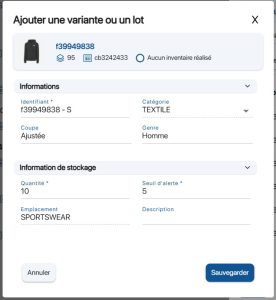 Create a variant or a lot
5. Save your changes with the Save.
6. You can consult the list of variants and lots available for your product.
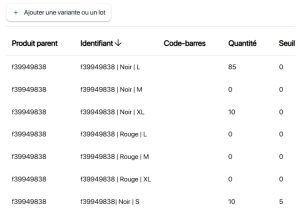 List of available variants and lots
7. Products containing at least one variant or batch will be identified by a specific icon.
 Product with variants and lots
To continue browsing, here are a few articles related to this page:

