The functionality Modify intervention templatefeature in the K inventory online inventory management application makes it easy to customize existing intervention templates. You can modify the name, description and tasks of your template to meet the specific needs of your intervention. Thanks to this feature, you can adapt your customized intervention templates quickly and easily, without compromising the integrity of your data. Find out how you can make changes to your custom templates on K inventory to optimize your intervention processes.
1. Left-click on Settings then on Intervention templates.
2. Click on the Modify icon of the model you wish to modify.
3. You can change the namedescription of the custom template.
4. Click the Add a task to add a new task to your intervention process. You can also delete a task by pressing the Delete. If you wish to modify an existing task, click on the Modify. You can duplicate an existing task by clicking on the Duplicate button. Finally, you can reorganize your tasks using the icon to Reorder.
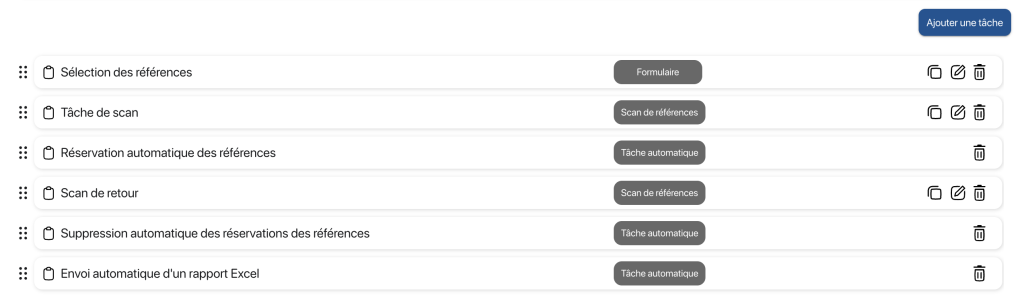
5. Confirm by pressing the Save
To continue browsing, here are a few articles related to this page:

