The module bundle is a K inventory feature that allows you to link several references together based on a brand and model. Updating a equipment configured in the bundle module will update the products associated with it.
1. In the menu on the left of the screen, click on Settings then on Associated outputs.
2. Click on the Modify icon of the associated output you wish to update.
3. In the Information tab, you can modify the fields below by clicking on the icon modify of the product concerned:
- Name (name of referral association)
- Brand (change the brand of the equipment type reference concerned)
- Model (change the model of the Equipment type reference concerned)
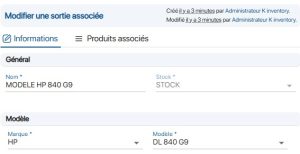 Modify a bundle
4. You can modify the table rows by clicking on the icon modify Once you have completed your update, confirm your entry by clicking on the  icon.
icon.
5. Click on the  icon in the product line to delete it.
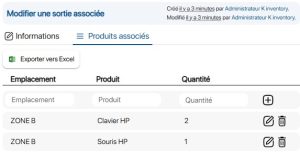 Association of products with the reference association
6. Save your changes with the Save.
To continue browsing, here are a few articles related to this page:

