Functionality Perform an entry/exit on a variant or batch function in K inventory allows you to add or remove a specific product variant from your stock.
This operation is carried out individually for each product. You can also schedule an intervention to manage a large number of products.
1. Use the 2. In the Variant list section, click on the Input/Output. 3. In the pop-up window Stock in / Stock outpop-up, complete the following information: 4. Enter the quantity to be entered or issued manually or by scanning the barcode or variant or lot identifier. 5. Save your changes with the Save.
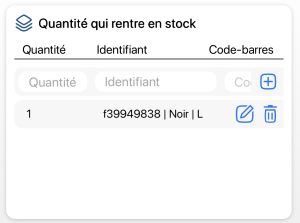
1. In the list of available products, click on a variant or batch. 2. Click on the Quantity button to create inputs and outputs. 3. In the Stock in / Stock outblock, complete the following information: 4. Enter the quantity to be entered or output manually or by scanning the barcode or variant or batch identifier, using the 5. Save your changes with the Save.
1. Use the 2. In the Variant list section, click on the Input/Output. 3. In the pop-up window Stock in / Stock outpop-up, complete the following information: 4. Enter the quantity to be entered or issued manually or by scanning the barcode or variant or lot identifier. 5. Save your changes with the Save.
1. In the list of available products, click on a variant or batch. 2. Click on the Quantity button to create inputs and outputs. 3. In the Stock in / Stock outblock, complete the following information: 4. Enter the quantity to be entered or output manually or by scanning the barcode or variant or batch identifier, using the 5. Save your changes with the Save.
 icon to scroll through the list of variants and lots available for a product.
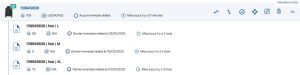 List of product variants and lots
 Perform an input/output on a variant or lot
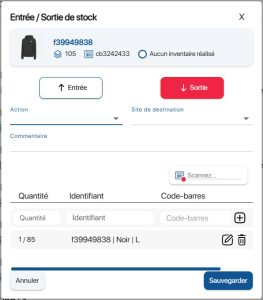 Entry/exit pop-up on a variant or an lot
 Scan a barcode
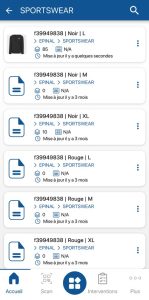 List of variants
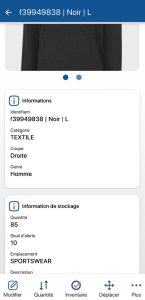 Variant or lot sheet
 Exiting a variant or a lot
 icon. icon to scroll through the list of variants and lots available for a product.List of product variants and lotsPerform an input/output on a variant or lot
Entry/exit pop-up on a variant or an lotScan a barcodeList of variantsVariant or lot sheet
Exiting a variant or a lot icon.
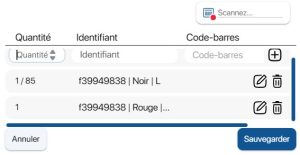 Multiple reference scanning
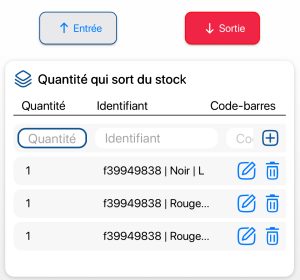 Multiple reference scanning
To continue browsing, here are a few articles related to this page:

