Facilities and IT asset management software for banking, insurance and service companies
One head office, dozens of branches, thousands of desks, chairs, computers and phones. K inventory gives facilities management and the IT department the same physical inventory: every asset is located, assigned and counted by scan, branch by branch.

What makes tracking the assets of a branch network difficult
The assets of a head office and its branches are constantly on the move: office moves, refits, employees joining and leaving. The spreadsheet, on the other hand, only moves once a year.
The annual inventory
Counting the assets of each branch, reconciling the count with the records, explaining the differences: with a spreadsheet, the exercise takes weeks and remains fragile.
Equipment that is never returned
An employee leaves, and their computer and phone cannot be found. Without a recorded assignment, nobody knows who had what.
Furniture on the move
Office move, flex office, branch closure: furniture changes site, goes for reuse or is donated. Every untracked movement skews the next inventory.
IT department requirements
Hosting, encryption, single sign-on, connection to the ticketing tool: a facilities management tool has to pass the IT security review.
The annual inventory by scan, branch by branch
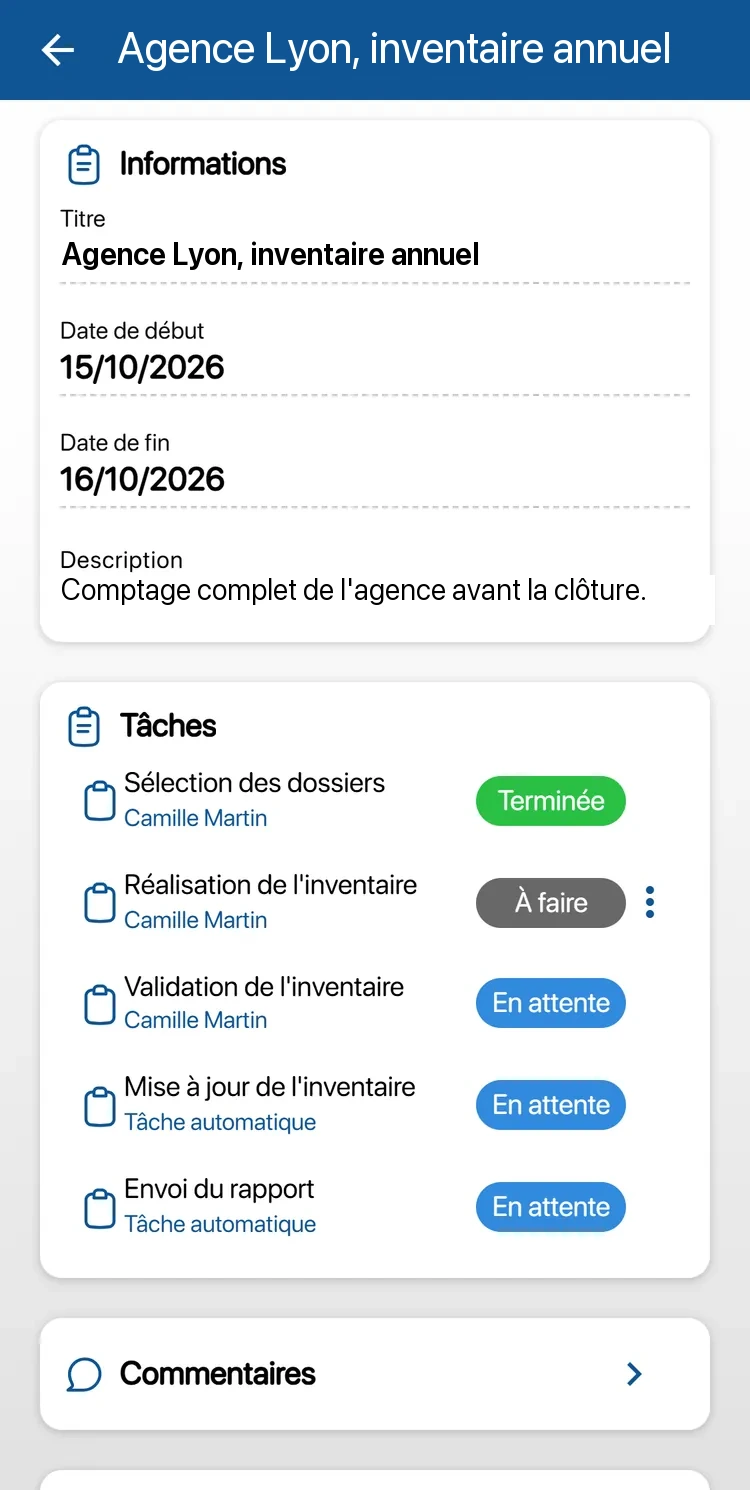
In K inventory, the head office and each branch, floor or office is a location, called a folder. The inventory is prepared on the web platform and carried out on the phone, folder by folder.
Inventory campaign split into tasks, assigned by branch or by site
Counting by scan with the phone camera, with no handheld scanner to buy, even without a network
Differences calculated between the count and the records, then validated on the web platform before the update
Furniture assigned by site or by branch, and identical equipment counted by quantity in each location
Barcode or QR code labels printed from the platform, inventory report sent automatically
Computers and phones tracked from the day an employee joins to the day they leave
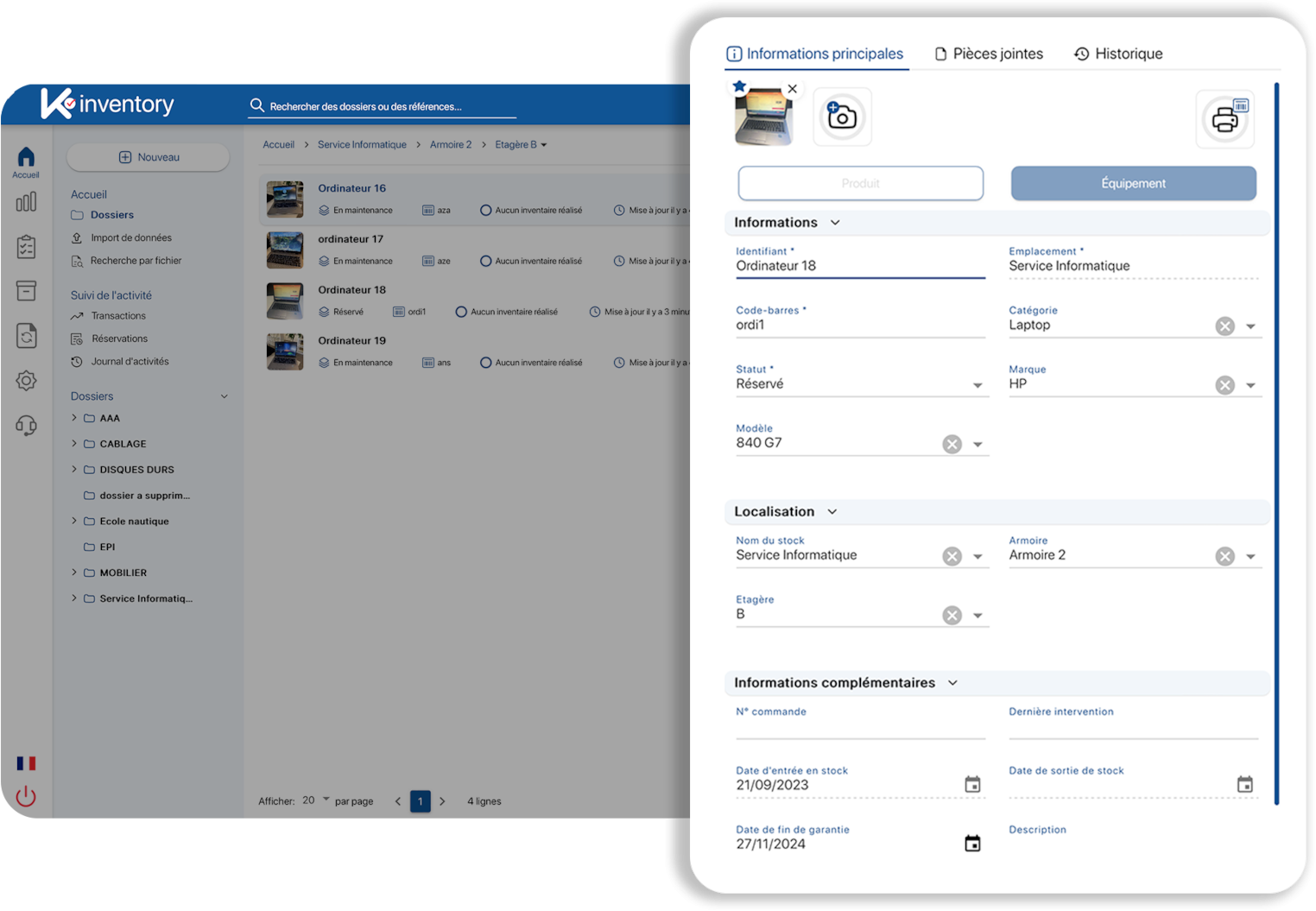
Assignment and return are the two moments when IT assets deteriorate fastest. K inventory turns them into two tracked, time-stamped operations, linked to an identified person.
Named assignment of a computer, phone or monitor, by scan or by NFC badge
Equipment status required on return, to tell a reusable computer from one that needs refurbishing
Serial number, model and IMEI tracked device by device, with associated SIM cards
Purchase dates, warranty end dates and lease contract deadlines tracked as fields in their own right
Cross-company view of all assigned equipment, across all employees
Move, refit and reuse without losing track of your assets
A head office move or a switch to flex office relocates hundreds of assets in a few days. In K inventory, each transfer is a move operation: prepared at departure and received at arrival, by scan.
Moves from one site to another in tracked steps: preparation, dispatch, receipt of the equipment
Furniture freed up by one branch identified and reassigned to another, rather than bought again
Documented removal from the asset base: reuse, donation, recycling or disposal, with the history kept
Time-stamped activity log: who moved what, when, and from where to where
A physical inventory to answer audits
Several obligations assume you know precisely what you own, where it is and what condition it is in. With an inventory kept by scan, the answer is ready on the day you are asked for it.
Annual accounting inventory
The French Commercial Code (article L123-12) requires companies to check the existence and value of their assets, fixed assets included, at least once every 12 months. The inventory by scan provides the physical part of this check, branch by branch.
DORA and IT assets
The EU DORA regulation, in force since January 2025, requires financial entities to keep an inventory of their IT assets. K inventory holds the physical part (identifier, location, holder); it does not map interdependencies, which belong in a configuration management database.
Lifespan and reuse
According to ADEME and Arcep (the French environment agency and telecoms regulator), end-user devices account for about half of the carbon footprint of digital technology in France. Extending the life of a computer or reusing furniture means knowing the age and condition of each asset.
CDC Informatique tracks more than 120,000 devices with K inventory
BNP Paribas and CDC Informatique, the IT subsidiary of the French public financial institution Caisse des Dépôts, use K inventory.
Faced with the complexity of managing our stocked assets spread across several sites in France, and the need to keep our teams in sync, K inventory gave us real-time visibility and helped us improve the operational efficiency of our logistics staff. The seamless integration with our ITSM was decisive: it optimised the day-to-day productivity of our 30 technicians, and it also turned our inventory data into a genuine strategic steering tool for our IT investments.
Security and integration: what your IT department will check
K inventory sits alongside your ticketing tool and your directory. It holds the physical reality of your assets, while the other tools hold incidents and identities.
Hosting and security
Data hosted in France by OVH and Ikoula, ISO 27001-certified hosting providers
TLS 1.3 encrypted connection, rated A+
Backups twice a day, 99.9% availability
Penetration tests carried out
Access and permissions
Single sign-on (SSO) with Microsoft Entra, Google or LDAP, with the Custom plan
Permissions by role and by folder: each branch only sees its own scope
Configurable password policy
Unlimited users
Alongside your tools
Complements GLPI or ServiceNow without replacing them: tickets stay in your tool
Connection through the no-code API module, with the Custom plan
Existing data taken over by Excel import
Excel exports for accounting and management control
Three situations the platform covers
Branch network
A head office and dozens of branches, each set up as a folder. The annual inventory is split into tasks by branch, carried out on the phone, and the differences go up to head office for validation.
Head office move
Desks, chairs, monitors and cabinets change floor or building. Each transfer is a move operation, and surplus furniture is reassigned or removed from the asset base with its reason.
Multi-site mid-sized service company
Computers, phones and spare stock across several sites. Tickets stay in the support team's tool; K inventory tracks who holds each device, where it is and what condition it comes back in.
Frequently asked questions from facilities and IT departments
Can we keep GLPI or ServiceNow for tickets?
Yes. K inventory does not replace your ticketing tool: it holds the physical side of your assets, that is, who has the equipment in hand, where it is, whether it has been returned and in what condition. The two tools are connected through our no-code API module, with no development, with the Custom plan.
Does K inventory do automatic network discovery?
No. K inventory does not install an agent on computers and does not scan the network. It tracks the physical object: its location, its holder, its condition and its dates. It can connect to your existing tools through the API module, with the Custom plan.
Can we take over our current inventory without re-entering everything?
Yes. Your current inventory is taken over by Excel import, with assisted matching between your columns and the fields of K inventory. Serial numbers, fixed asset numbers or cost centres are set up as custom fields.
Will your security satisfy our IT department?
Data is hosted in France (OVH and Ikoula, ISO 27001-certified hosting providers), the connection is encrypted with TLS 1.3, rated A+, backups run twice a day and availability is 99.9%. Penetration tests have been carried out. Single sign-on (SSO) with Microsoft Entra, Google or LDAP is available with the Custom plan.
Can we feed our fixed asset accounting module?
Yes, by Excel export or through the API module with the Custom plan. K inventory gives you the physical inventory, asset by asset and site by site; depreciation is still calculated in your accounting tool. We look at the format your tool expects during the demo.
How much does K inventory cost for 2,000 or 20,000 assets?
The price depends on the number of items, not on the number of users, which is unlimited. A device tracked individually, a computer for example, counts as one item. Equipment managed by quantity counts as a single item per location: 30 identical chairs in a branch = 1 item. Above 1,000 items, the Custom plan is quoted on request, for SMEs and large accounts alike.
Do we need to buy barcode readers for the branch inventory?
No. The mobile app uses the phone camera to read barcodes and QR codes. Your Bluetooth handheld scanners work too. Inventory tasks can be done even without a network and are sent once the connection is back.
Can you install K inventory on dedicated infrastructure?
Yes. K inventory comes in two modes. As a shared instance (multi-tenant), all customers use the same platform, hosted in France, with automatic updates and an immediate start: this is the mode of the Essential and Advanced plans and of the free trial. As a dedicated instance (single-tenant), your organisation has its own infrastructure, isolated from that of other customers, with support during deployment: this is the choice of large accounts and of organisations whose IT department requires it (banking, public sector, healthcare…). It is part of the Custom plan. We discuss it during a demo, with your IT department if you wish.
IT assets and facilities management on our blog
Asset management, equipment lifecycle, inventory, customer use cases: find our guides and experience reports on asset management.
9 articles published under the IT assets tagK inventory also adapts to other industries
Discover how K inventory meets the specific constraints of each sector.



One inventory for furniture and IT assets
See on your own branches how the annual inventory is prepared and how joiners and leavers are tracked.
Enjoy a 14-day free trial of K inventory!
When you sign up, you can use all the features of K inventory for 14 days.
Contact us
Would you like us to contact you? Enter your email address below!