Construction equipment management software: tools, plant and PPE, from depot to site
Who has the core drill? Which site is the motor pump on? When is the next VGP (the French mandatory periodic inspection) due for the aerial work platform? K inventory answers these questions in a few scans. Every tool, machine or item of PPE is assigned to a person or a site, every exit from the depot is tracked, and your site managers scan with their phone camera, even without a network.
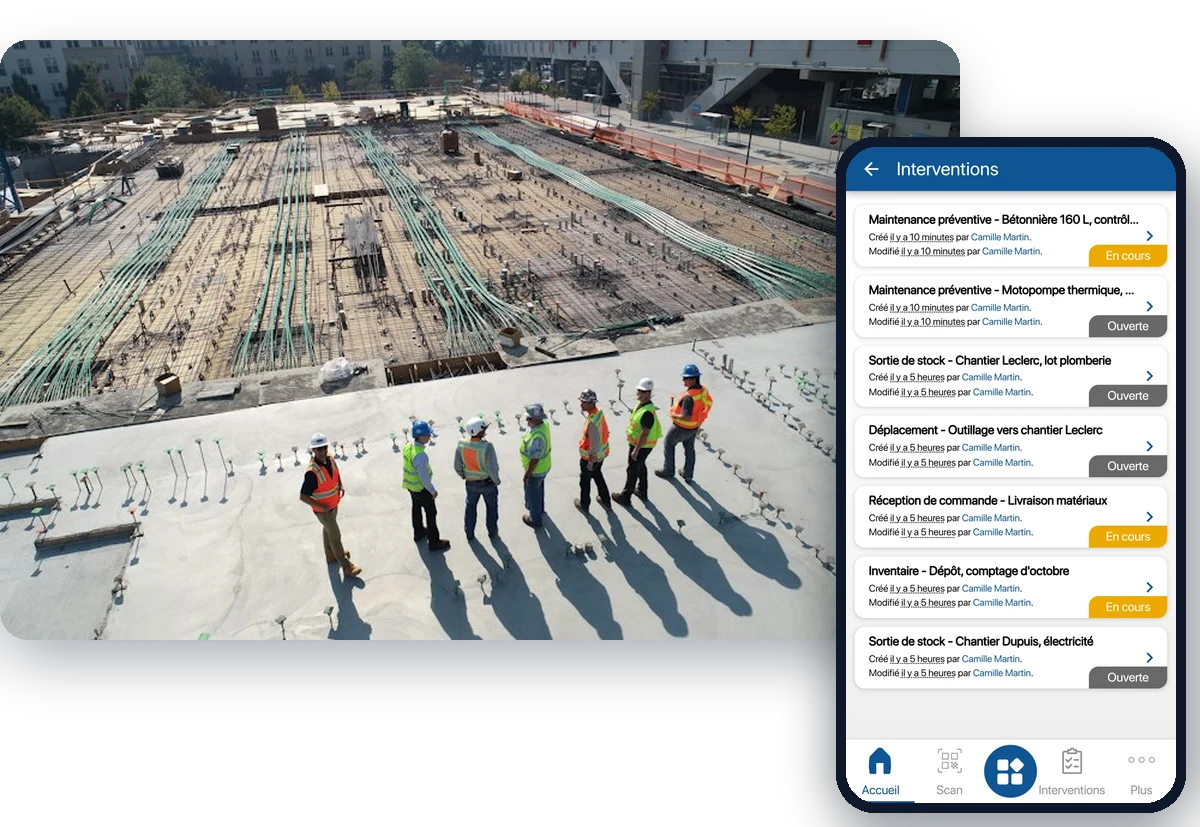
Four problems every equipment manager knows
In a building, construction or public works company, there is one depot, dozens of open sites and hundreds of tools moving between teams. As long as the information lives in a spreadsheet and on the phone, equipment gets lost faster than it is found.
Equipment that disappears
A hammer drill lent without a trace, an angle grinder left behind on a closed site, a theft discovered too late. According to the FFB (French Building Federation), 7 companies out of 10 have already had machinery stolen. Without a history, there is no way to know who had it last.
The missed VGP
An aerial work platform, a hoist or a sling whose periodic inspection date has passed without anyone noticing. The equipment then has to be taken out of service, often at the worst possible moment.
Renting twice
A mini excavator is rented for a site while the one at the depot is available, or tied up on a nearby site that no longer needs it. The cost only shows up on the rental company's invoice.
No network on site, a site manager in a hurry
Basement, dead zone, bottom of an excavation: there is no signal. And a site manager has neither the time to re-enter data nor the wish to carry yet another handheld scanner.
Every tool assigned to a person or a site
The first defence against loss is knowing at all times who holds a piece of equipment. In K inventory, a tool, a machine or an item of PPE is assigned to a worker, a site manager or a site, then returned. The history keeps track of every change of hands.
Assignment and return by scan, from the phone
Loans and returns tracked: who has it, since when, in what condition
Equipment status entered on return, to spot straight away a tool that needs repairing before it is lent again
NFC badges available to identify the person at the time of assignment
View of all the equipment assigned to a person, useful when they leave or at the end of a job
Practical guide: how to manage tools, from the depot to the job site
See equipment fleet management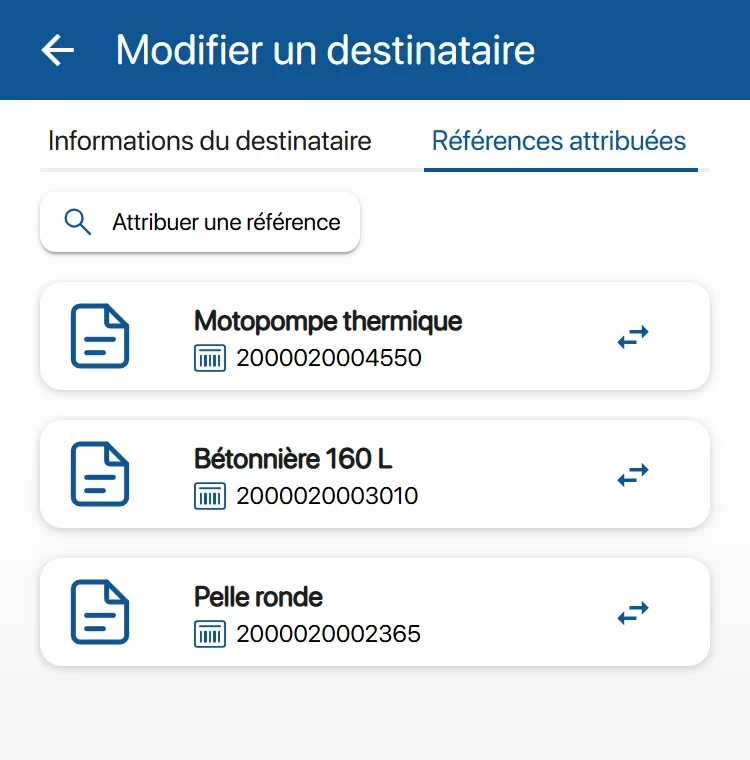
From depot to site, every exit tracked
Equipment leaves the depot for a site, moves from one site to another, then comes back. With the move operation, preparation, dispatch and receipt are done by scan, and the location of each item updates by itself.
Depot, sites, vans and containers set up as locations in the same tool
Moves in steps: preparation at the depot, dispatch, receipt on site, with a report sent automatically
Scanning can be made mandatory for stock exits, so that no tool leaves without being recorded
Consumables and disposable PPE managed by quantity, with an alert before they run out
Equipment inventory by scan, depot by depot and site by site, with differences calculated
Before renting, you see whether an equivalent machine is available at the depot or on another site
Osiris, an installer, tracks 5 stocks and 2,000 items between its depot and its sites with K inventory. Read the case study
See inventory management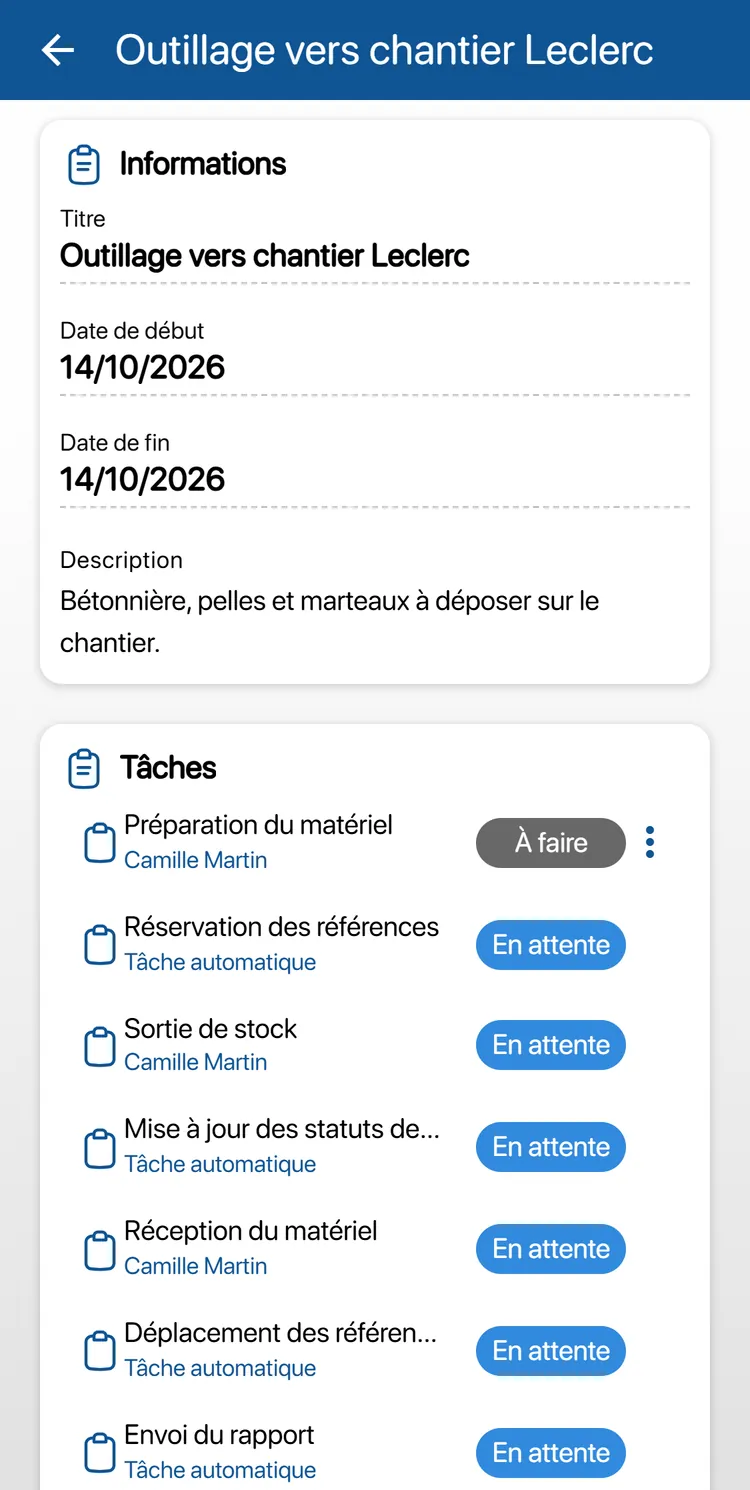
VGP and PPE inspections planned, with a reminder before the due date
Lifting equipment is subject to periodic general inspections (VGP), every 6 or 12 months depending on the equipment (French order of 1 March 2004). Fall protection PPE must be inspected at least once a year. K inventory plans these inspections and warns you before they are due, instead of you finding out too late.
Inspections planned per piece of equipment, by date or by hour meter, with a reminder before each due date
Inspection form filled in on the phone: general condition, checkpoints, meter reading, date of the next inspection
Inspection body's report attached to the equipment record, with the full history
PPE expiry dates and inspections tracked, item by item or batch by batch
“Under maintenance” status to flag that a machine must not go out to a site
Practical guide: how to manage your teams' PPE
See the maintenance module (CMMS)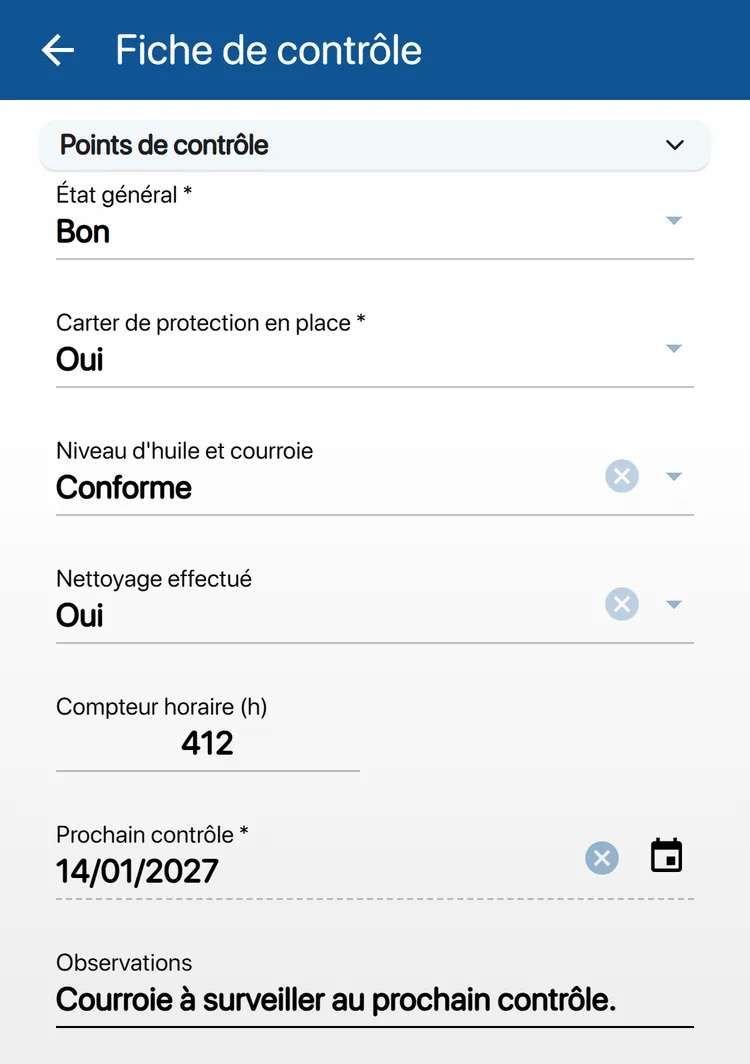
A tool your site managers actually use
Equipment management software is only as good as what gets scanned in the field. K inventory is designed for teams who have other things to do.
No handheld scanner to buy
The phone camera reads barcodes and QR codes continuously, with torch and zoom. Each read is confirmed by a beep and a vibration. NFC badges and Bluetooth handheld scanners are also supported.
Even without a network
Operations are downloaded to the phone before setting off. On site, scans, quantities and forms are kept on the device, then sent in order once the network is back. Offline, only the Operations menu is available.
Little data entry
Continuous scanning reads code after code without pressing each time. An item can be created from a photo, with AI pre-filling the record (module depending on your plan). And to find a label in a rack, the camera highlights the right code in green.
Organise your equipment fleet the way your company is organised
Depots, sites, vehicles
Locations form a tree with no depth limit: depot, zone, rack, site, truck. When a site closes, it is emptied and its equipment returns to the depot through a tracked move.
Everyone sees their own scope
Permissions are set by feature and by folder. A site manager can be limited to the equipment of their own sites, while the equipment manager sees everything. Users are unlimited, whatever the plan.
Your fields, your vocabulary
Serial number, brand, hour meter, date of the last VGP, rental company and return date for rented equipment: you set up the fields you need as custom fields, with no development.
Three situations K inventory covers
Opening a site
The works manager creates the operation on the web. At the depot, the storekeeper prepares and scans every tool and every item of PPE that goes out. The site manager receives them on site, by scan. The report goes out by itself.
Back to the depot
At the end of a job, every returned tool is scanned and its condition entered. Whatever has not come back stays assigned, in the name of a person or a site: you know who to ask.
An inspection coming up
The reminder arrives before an aerial work platform's VGP. You know which site it is on, the inspection is planned, and the inspection body's report is attached to its record. Harnesses due for inspection are found in the same way.
Frequently asked questions from equipment managers
There is no network on our sites. Does the app still work?
Yes, for operations. Download them while you have a network: on site, you do your scans, quantities and forms without a connection. Everything is kept on the phone, then sent in order once the network is back. Offline, only the Operations menu is available, and the app shows how old your data is.
My site managers won't scan. How do we keep it simple?
The phone they already have is enough: the camera reads barcodes and QR codes continuously, with no handheld scanner. Each read is confirmed by a beep and a vibration. Scanning can be made mandatory for a stock exit. Users are unlimited: each site manager has their own access, at no extra cost.
How do we track VGP and PPE inspections?
Each machine or item of PPE concerned has its next inspection date, with a reminder before it is due. The inspection is done on the phone with a form you create on the web, and the inspection body's report is attached to the equipment record.
Does K inventory locate machinery by GPS?
No. K inventory is not a geolocation tracker: it reports neither real-time position nor engine hours. It tells you who and which site a machine is assigned to, and what its last scanned movement was. That is what lets you find equipment and know what is available before renting.
Can we track rented equipment too?
Yes. A rented machine can be recorded as an item, with the rental company and the planned return date as custom fields. It is assigned and moved like your own equipment, so you do not have to hunt for it on the day it has to go back.
How much does K inventory cost for a fleet of 3,000 tools?
Plans are counted in items, never in users. A tool tracked individually counts as one item; a consumable managed by quantity counts as a single item per location. Essential: €175 per month for up to 500 items. Advanced: €390 per month for up to 1,000 items. Beyond that, as for a fleet of 3,000 tools tracked individually, the Custom plan is quoted on request.
Can we take over our current Excel file?
Yes. Your current inventory is taken over by Excel import, and barcode or QR code labels are printed from the platform. You can test with your own data during the 14-day free trial.
Construction on our blog
Tool management, tracking equipment between depot and sites, PPE, case studies: find our publications on site equipment, including the Osiris case.
Articles published under the Construction tagK inventory also adapts to other industries
Discover how K inventory meets the specific constraints of each sector.


Know where every tool is, on every site
Less lost equipment, VGP inspections prepared on time, and a real answer before renting. Let's look at your equipment fleet together during a demo.